
Combining consignment software with appointments in Calendly: how to easily streamline your intake moments

What is consignment software and why does it matter?
Consignment software helps second-hand stores manage items that customers bring in. Instead of messy paper notes or Excel lists, consignment software like Cirquly centralises all data in one place: from inventory management to commissions and payouts.
For stores that receive dozens of consignors every day, good software offers not only overview but also time savings. It makes the work less error-prone and builds more trust with customers.
Challenges of managing intake moments without software
When customers just walk in with bags full of clothing, chaos quickly follows. Without a good structure, long waiting times can arise, staff lose track and the risk of errors is high.
Many second-hand stores experience problems such as:
- Unexpected rushes at certain times
- Lack of space for intake
- No clear system to know who brought what and when
This leads to frustration for both customers and staff.
Benefits of working by appointment in a second-hand store
Scheduling intake moments by appointment offers many benefits:
- Time savings: you know exactly when someone is coming
- Better customer experience: customers feel taken seriously
- Efficient use of staff: you can schedule your team better
- Less chance of errors: you handle one customer at a time
Stores that receive many customers every day in particular notice the difference immediately when they switch to an appointment model.

Streamlining appointments with tools like Calendly
Calendly is a popular, user-friendly appointment scheduler. It is fully online, works with a link and integrates easily with your calendar.
What can you do with Calendly?
- Create appointments for fixed time slots (e.g. 20 minutes per customer)
- Set availability (e.g. only Monday and Thursday)
- Let customers choose from available times
- Send automatic confirmations and reminders
Calendly has a free version that already lets you do a lot. Ideal for new stores or small businesses.
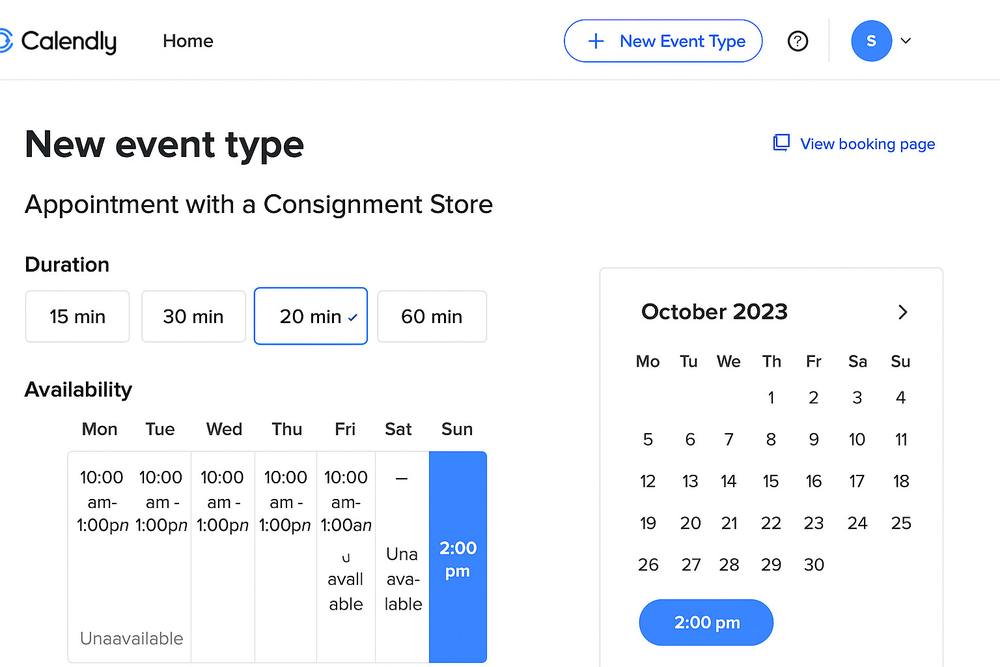
How to set up Calendly for your consignment business
- Create a free account at www.calendly.com
- Set your availability, for example: Monday to Friday from 10:00 to 16:00
- Add buffer time between appointments (e.g. 10 minutes)
- Specify how many minutes you need per appointment (e.g. 20 min per customer)
- Enable email reminders for customers
- Add instructions such as: “Bring a maximum of 15 garments”
That way you have your own digital appointment system set up within 10 minutes.
Sharing the Calendly link on your website and social media
You can easily place your personal appointment link (e.g. calendly.com/jouwwinkel) on your website or share it on Instagram and Facebook. Use phrases such as:
"📅 Want to bring in clothing? Book an appointment quickly and easily via our calendar!"
Do you have a WordPress site? Then you can also embed Calendly as a widget on your contact page.
Setting up automatic reminders for customers
With Calendly, customers automatically receive a reminder by email (and with paid versions also by SMS) 24 hours before the appointment. This prevents no-shows and ensures everyone arrives well prepared.
Tip: also add useful info to the reminder email:
- Parking info
- Max. number of items
- Packaging (e.g. clean clothing in a bag)
Checking your appointments daily in Calendly
Every morning you simply open your Calendly dashboard or click your shortcut. There you see in one overview:
- Who is coming today
- At what time
- Any comments they may have added
That way you start your workday with structure and calm.
Other alternatives to Calendly for appointment management
Although Calendly is very popular, there are other options:
| Tool | Benefits | Notes |
|---|---|---|
| Microsoft Bookings | Integrated with Outlook | Especially useful if you already use Microsoft 365 |
| SimplyBook.me | Many customisable options | Good option for larger stores |
| Google Calendar with Forms | Simple and free | Less automated |
Still, Calendly remains the best choice for simplicity and ease of use.
How to connect consignment software like Cirquly to your appointment process
Use Cirquly to:
- Enter customer details after an appointment
- Register items immediately during intake
- Track sales overviews automatically
Combine this with Calendly for a complete workflow: from appointment → to registration → to sale and payout.
Tips for setting up your consignment process affordably and efficiently
- Start with free tools (Calendly Free + Cirquly Basic plan)
- Automate step by step: start with appointments, add inventory management later
- Work with clear processes and time slots
- Train your team to work with both tools
Common mistakes when scheduling intake appointments (and how to avoid them)
| Mistake | Consequence | Solution |
|---|---|---|
| Not sending a reminder | Customer forgets appointment | Use automatic emails |
| No buffer time between customers | Overlaps | Schedule 5-10 min in between |
| Vague instructions | Customer brings too many or the wrong items | Be clear about terms |
An alternative to appointments: drop-off without the customer present
Not every store wants to or can work with an appointment system. Another efficient approach is letting customers drop off clothing without staying. The customer leaves a bag of clothing at the store with a clear label showing their name and contact details.
The store processes the bag at a quiet moment and:
- Selects the sellable garments
- Records them in the consignment system
- Gets the items ready for sale
Important: clothing that is not selected must be collected again by the customer within an agreed period. This requires:
- Clear communication in advance (for example by email or via an info leaflet)
- Agreements on when and how customers get their remaining clothing back
- Possibly a reminder system
This method is ideal for stores with limited time or little room for long conversations, but it does require a tight system to process everything correctly.

Frequently asked questions (FAQ) about consignment software and scheduling appointments
1. What exactly is consignment software?Consignment software helps you register, manage and pay out consigned items in a second-hand store.
2. Is Calendly free?Yes, there is a free version that lets you set up one type of appointment. For more features there is a paid version.
3. How do I put an appointment link on my website?Use Calendly’s HTML embed code or add a button with your unique link.
4. Can I connect Cirquly to my appointment tool?A direct connection isn’t possible (yet), but you can easily use both tools side by side.
5. What if a customer doesn’t show up?Set up automatic reminders and ask customers to confirm.
6. How much time should I reserve per intake?That depends on your process. On average, 15-20 minutes per customer is common.
Conclusion: combine consignment software with smart scheduling tools for success
Combining efficient consignment software like Cirquly with an appointment scheduler like Calendly brings calm, overview and professionalism to your second-hand store. Customers know what to expect and you can work with focus.
Whether you are just starting out or have run a store for years: this approach is affordable, easy and proven to work.